

I logged into Google Analytics a day in November 2025, and nearly fell out of my chair. My traffic had supposedly tripled overnight.
Which sounds great until you realize it’s all fake… But most of it came from China and Singapore bots.
What Is Happening?
The massive spike in traffic from Lanzhou, China or Singapore isn’t a random glitch, it’s widespread bot traffic that’s been hitting websites since late 2025 and has gotten worse in 2026.
My own websites sometime get 5000-7000 spam bots visits in GA4. People call it “ghost traffic” and it’s a pain to deal with.
The problem with this is that it prevents you from understanding your real users.
- Your conversion rates look terrible because half your traffic bounces immediately,
- your engagement metrics are meaningless,
- your geographic targeting is based on false information.
Trying to make decisions based on your analytics? You’re basically flying blind.
Google confirmed the traffic is inauthentic and they’re “working on a fix” but in the meantime your data is basically useless.
The Chinese Spam Pattern
What frustrates me most is that GA4’s bot filtering just isn’t handling this, for months now. I wouldn’t think one of the most valuable companies in the world couldn’t filter this, the footprints are obvious.
The transition from Universal Analytics to GA4 seems to have made things worse in some ways. The event model is powerful but it looks like it is more sensitive to junk traffic.
The device pattern of the spam traffic is obvious:
- Almost all of this fake traffic shows up as outdated Windows machines
- with virtually no mobile traffic,
- a weird screen size,
- and 0 second visits.
But already the fact that mobile dominates real browsing nowadays (like over 60% for most sites), so that’s a dead giveaway something’s off.
Try creating a filter for this in GA4, and you’ll realize that it will only affect your custom reports, not all of the standard reports in GA4. Not a good solution.
My Cloudflare Fix That Solved The China Spam Problem
Reading through countless Reddit threads and trying a few things that didn’t work, I found a solution using Cloudflare that actually fixed the problem.
Best part is that you can do this with a completely free Cloudflare account.
Here’s what worked for me.
1. Making Sure Your DNS Records Are Proxied
This part is important and a lot of people miss it I’ve noticed. I didn’t have proxy set up either, and in hingsight, never understood why Cloudflare analytics wasn’t showing me anything.
So just do this:
- Log into your Cloudflare dashboard
- Go to DNS settings,
- Make sure your A records are showing that orange cloud icon which means proxied status, not the grey cloud.

Grey clouds need to get toggled to orange.
Without proxied DNS Cloudflare’s security features won’t work at all because traffic isn’t actually flowing through their network. This seems basic to you if you know Cloudflare, but loads of webmasters try to set up rules without this enabled and then wonder why nothing changed.
2. Creating Security Rules to Block the Spam
Once your DNS is proxied go to your domain in Cloudflare, then navigate to Security → Security Rules. Click “Create Rule” and you’ll want to set up two separate rules for maximum effectiveness.
Blocking Tencent ASNs
These specific Autonomous System Numbers are where a huge chunk of the spam originates. Set up your rule like this:
- Field: AS Num
- Operator: equals
- Value: 13220
Then add an “Or” condition:
- Field: AS Num
- Operator: equals
- Value: 132203
This targets Tencent’s infrastructure specifically which is responsible for a ton of the fake traffic hitting GA4 right now. Some people think it is tencent training their AI.
Blocking China and Singapore Altogether
For the second rule I went broader:
- Field: Country
- Operator: equals
- Value: CN
Add another “Or”:
- Field: Country
- Operator: equals
- Value: SG
Action: Block.
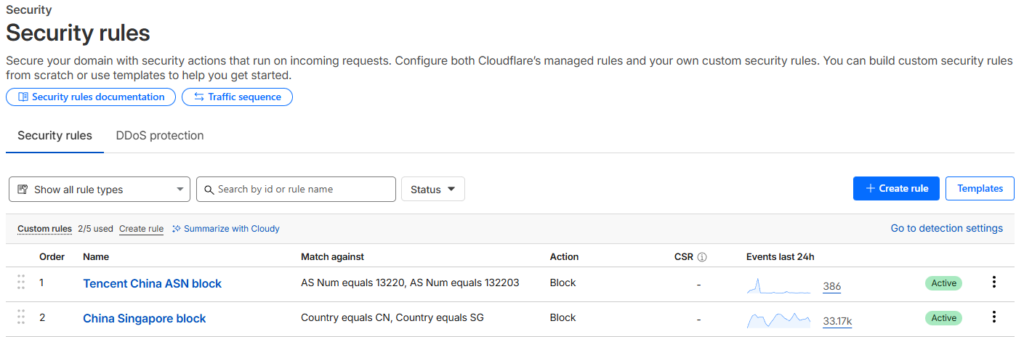
Alternative: Some people use “Challenge” instead of “Block” here which would theoretically let legitimate human users from those countries through after completing a challenge. Do this if you actually have customers in China or Singapore, but my point of view is I don’t target those markets at all so I just went with a hard block.
What Happened After I Implemented This
The change was immediate after implementing both rules.
My Chinese traffic in GA4 dropped to nearly zero, still get 1-2 sessions somehow slipping through occasionally but we’re talking about going from thousands of fake sessions to maybe a couple per week. Doesn’t distort the analytics anymore.

My engagement rate went back to normal. Session duration made sense again, the geographic reports actually reflected where my real users are located. It felt like someone had turned the lights back on.
Why This Works When Other Solutions Don’t
The reason Cloudflare security rules are so effective is because they operate at the network level before requests even reach your site, and GA4 fires. Other solutions try to filter things after the fact but that doesn’t help with ghost traffic that never touches your server anyway.
Blocking by ASN is particularly powerful, it doesn’t matter if the bots rotate IP addresses they’re still coming from the same network infrastructure.
Manually blocking individual IPs is completely pointless when dealing with bot networks that can spin up thousands of new addresses.
The combination of ASN blocking plus geographic blocking creates multiple layers of defense. Even if some traffic finds a way around one rule it’ll likely get caught by the other.
What You Need to Know Before You Do This
A few things to keep in mind before you implement this:
Check if you actually need traffic from China or Singapore. Running an e-commerce site that ships internationally or you have legitimate users in those regions means blocking entire countries might hurt your business. In that case stick with just the ASN rules or use Challenge instead of Block.
This won’t fix your historical data. Everything that already got logged in GA4 is still there, you’ll need to use segments or filters in your reports to exclude that period or create exploration reports that filter out China and Singapore traffic.
Google is supposedly working on a permanent fix but there’s no timeline. And they’ve been doing this for months, I wouldn’t hold my breath.
Server-level blocking won’t help with ghost traffic. Tried blocking at the firewall level first and it did nothing because these bots aren’t actually requesting pages from my server. They’re sending fake measurement calls straight to Google’s servers which bypasses everything on your end.
The Bigger Picture
This whole situation reveals something important about the state of web analytics in 2026 I think. We’re more dependent than ever on platforms like GA4 to understand our audience but those platforms seem to be vulnerable to manipulation.
Google’s acknowledgment that they can’t automatically filter every new bot pattern is pretty telling.
It also shows how valuable services like Cloudflare have become, even their free tier gives you tools that can solve problems Google hasn’t figured out yet.
Running a website right now, especially if you’re using GA4 to make business decisions, I’d say implementing these Cloudflare rules appears to be basically mandatory.
The fake traffic from China and Singapore isn’t just annoying it actively prevents you from understanding your real users.

