If you run a membership site with MemberPress Courses, you probably know how frustrating it is to check on student progress.
Clicking through individual user profiles one by one gets if you have more than 2 students…
But you should care. Research shows that 70% of online course students drop out after week two, and the average completion rate sits between 10-20% across most platforms.
That’s rough.
Students who disappear aren’t always giving up because your content is bad, they might just need a nudge at the right time but you can’t nudge someone if you don’t know they’re stuck.
Why Seeing Course Progress Stats in One Place Actually Matters
I’ve been managing WordPress membership sites for years and honestly the biggest gap in MemberPress Courses is the lack of a consolidated progress dashboard.
MemberPress gives you individual progress tracking per student which is fine, but you simply can’t click on the profile of every student every week.
That’s way to many clicks just to get a sense of who’s active and who’s not.
A proper LMS analytics dashboard should help you spot where learners are stopping and which modules cause problems.
Without this view you’re basically flying blind, you might have students who signed up 30 days ago and never started lesson one but you wouldn’t know unless you manually checked each profile.
A centralized dashboard lets you identify things fast:
- Students who haven’t logged in for weeks and need re-engagement
- Courses where everyone stalls at the same point, that’s probably a content problem
- Active students who are crushing it and could give you great testimonials
What This MemberPress LMS Stats Custom Plugin Does
MemberPress does many things well, but not this.
But thankfully it has Objects that reveal everything we need.
So I built a comprehensive stats page that lives under MemberPress > Course Stats, it shows all your students in one sortable filterable table.

What it tracks:
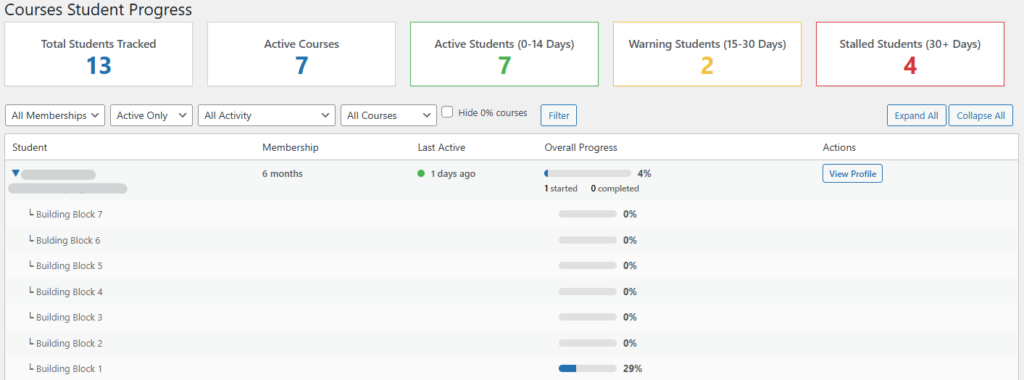
- Student activity status with color-coded indicators. Green means active in last 14 days, yellow is 15-30 days inactive, red is 30+ days or never logged in. This immediately shows you who needs attention.
- Course progress per student including overall average progress, number of courses started and number completed. You can expand each student row to see their progress in every individual course (which is pretty handy).
- Multiple filter options so you can narrow down by membership type, active/inactive status, activity level, specific course, and even hide 0% progress courses to declutter the view.
- Quick stats at the top showing total students tracked active courses and breakdown of active/warning/stalled students. These numbers update based on your filters so if you filter to just premium members the stats reflect only that group.
Plus a dashboard bonus I’ll reveal later 😉
How to Install It
The simplest way to get it up and running is as an MU-plugin which means it loads automatically and won’t get deactivated by accident like regular plugins sometimes do.
Installing this is pretty simple if you’ve ever worked with WordPress files before.
- Access your WordPress site via FTP or your hosting file manager,
- navigate to
/wp-content/mu-plugins/(if this folder doesn’t exist you’ll need to create it), - then create a new file called
gp-course-dashboard.php - and paste in the plugin code.
- Save the file. That’s it.
No activation needed in the Plugins menu. MU-plugins load automatically.
Just go to MemberPress > Course Stats in your admin menu and you’ll see the new dashboard.
Here is the source code:
<?php
/**
* Plugin Name: Guitar Playground Course Dashboard
* Description: Dashboard to track student progress, identify stalls, and quick-link to user profiles.
* Version: 1.7
* Author: Guitar Playground
*/
// Prevent direct access
if (!defined('ABSPATH')) {
exit;
}
class GP_Course_Dashboard {
public function __construct() {
add_action('admin_menu', array($this, 'add_menu_page'), 99);
add_action('admin_enqueue_scripts', array($this, 'enqueue_styles'));
add_action('wp_dashboard_setup', array($this, 'add_dashboard_widget'));
}
/**
* Add the menu item under MemberPress
*/
public function add_menu_page() {
if (!defined('MEPR_LIB_PATH')) return; // Only if MemberPress is active
add_submenu_page(
'memberpress',
'Course Stats',
'Course Stats',
'manage_options',
'gp-course-stats',
array($this, 'render_dashboard')
);
}
/**
* Add Dashboard Widget
*/
public function add_dashboard_widget() {
if (!current_user_can('manage_options')) return;
wp_add_dashboard_widget(
'gp_student_stats_widget',
'Guitar Playground Student Stats',
array($this, 'render_dashboard_widget')
);
}
/**
* Render Dashboard Widget Content
*/
public function render_dashboard_widget() {
if (!class_exists('MeprUser') || !class_exists('\memberpress\courses\models\Course')) {
echo '<p>MemberPress or MemberPress Courses is not active.</p>';
return;
}
// Get ALL users
$args = array(
'orderby' => 'registered',
'order' => 'DESC',
'number' => -1 // Get all users
);
$all_users = get_users($args);
// Filter only active membership users
$users = array();
foreach($all_users as $user) {
$mepr_user = new MeprUser($user->ID);
$active_memberships = $mepr_user->active_product_subscriptions('ids');
if (!empty($active_memberships)) {
$users[] = $user;
}
}
// Get courses
$courses = get_posts(array('post_type' => 'mpcs-course', 'numberposts' => -1, 'post_status' => 'publish'));
// Calculate activity stats
$stalled_count = 0;
$warning_count = 0;
$active_count = 0;
foreach($users as $u) {
$mepr_user = new MeprUser($u->ID);
$last_login = $mepr_user->get_last_login_data();
$days = null;
if($last_login && !empty($last_login->created_at)) {
$days = floor((time() - strtotime($last_login->created_at)) / DAY_IN_SECONDS);
}
if ($days === null || $days > 30) {
$stalled_count++;
} elseif ($days > 14) {
$warning_count++;
} else {
$active_count++;
}
}
?>
<style>
.gp-widget-stats { display: flex; flex-wrap: wrap; gap: 10px; margin-top: 15px; }
.gp-widget-card { flex: 1; min-width: 120px; background: #f6f7f7; padding: 12px; border-radius: 4px; text-align: center; border-left: 4px solid #2271b1; }
.gp-widget-card.green { border-left-color: #46b450; }
.gp-widget-card.yellow { border-left-color: #f0c33c; }
.gp-widget-card.red { border-left-color: #d63638; }
.gp-widget-card h4 { margin: 0 0 8px 0; font-size: 0.85em; color: #50575e; font-weight: 600; }
.gp-widget-card .gp-number { font-size: 2em; font-weight: bold; color: #2271b1; display: block; line-height: 1; }
.gp-widget-card.green .gp-number { color: #46b450; }
.gp-widget-card.yellow .gp-number { color: #f0c33c; }
.gp-widget-card.red .gp-number { color: #d63638; }
.gp-widget-link { display: inline-block; margin-top: 15px; text-decoration: none; }
</style>
<div class="gp-widget-stats">
<div class="gp-widget-card">
<h4>Total Students</h4>
<span class="gp-number"><?php echo count($users); ?></span>
</div>
<div class="gp-widget-card">
<h4>Active Courses</h4>
<span class="gp-number"><?php echo count($courses); ?></span>
</div>
<div class="gp-widget-card green">
<h4>Active (0-14d)</h4>
<span class="gp-number"><?php echo $active_count; ?></span>
</div>
<div class="gp-widget-card yellow">
<h4>Warning (15-30d)</h4>
<span class="gp-number"><?php echo $warning_count; ?></span>
</div>
<div class="gp-widget-card red">
<h4>Stalled (30+d)</h4>
<span class="gp-number"><?php echo $stalled_count; ?></span>
</div>
</div>
<p>
<a href="<?php echo admin_url('admin.php?page=gp-course-stats'); ?>" class="gp-widget-link button button-primary">
View Full Course Stats →
</a>
</p>
<?php
}
/**
* Add some basic CSS and vanilla JS for the dashboard
*/
public function enqueue_styles($hook) {
if ($hook != 'memberpress_page_gp-course-stats') {
return;
}
?>
<style>
.gp-stats-card { background: #fff; padding: 20px; border: 1px solid #ccd0d4; box-shadow: 0 1px 1px rgba(0,0,0,.04); margin-right: 20px; flex: 1; text-align: center; }
.gp-stats-card h3 { margin: 0; font-size: 1.2em; color: #50575e; }
.gp-stats-card .number { font-size: 2.5em; font-weight: bold; color: #2271b1; display: block; margin-top: 10px; }
.gp-container { max-width: 1400px; margin-top: 20px; }
.gp-flex { display: flex; justify-content: space-between; margin-bottom: 20px; }
/* Status Indicators */
.status-dot { height: 10px; width: 10px; border-radius: 50%; display: inline-block; margin-right: 5px; }
.dot-green { background-color: #46b450; }
.dot-yellow { background-color: #f0c33c; }
.dot-red { background-color: #d63638; }
/* Progress Bar */
.gp-progress-bg { background: #e0e0e0; border-radius: 5px; height: 10px; width: 80px; display: inline-block; overflow: hidden; }
.gp-progress-fill { background: #2271b1; height: 100%; display: block; }
/* Collapsible Rows */
.user-summary-row { cursor: pointer; font-weight: 500; }
.user-summary-row:hover { background-color: #f6f7f7 !important; }
.user-detail-row { display: none; background-color: #fafafa; border-left: 3px solid #2271b1; }
.user-detail-row td { padding-left: 30px !important; font-size: 0.95em; }
.toggle-icon { display: inline-block; transition: transform 0.2s; margin-right: 8px; color: #2271b1; font-weight: bold; }
.expanded .toggle-icon { transform: rotate(90deg); }
.course-name-detail { color: #666; }
/* Table */
.wp-list-table th { font-weight: bold; }
.action-btn { text-decoration: none; padding: 4px 8px; border: 1px solid #2271b1; border-radius: 4px; color: #2271b1; font-size: 12px; transition: 0.2s; white-space: nowrap; }
.action-btn:hover { background: #2271b1; color: white; }
/* Filters */
.gp-filters { margin-bottom: 10px; }
.gp-filters select { margin-right: 10px; }
.gp-filters label { margin-right: 15px; }
/* Summary Stats */
.summary-stat { display: inline-block; margin-right: 15px; font-size: 0.9em; color: #666; }
.summary-stat strong { color: #000; }
</style>
<script>
document.addEventListener('DOMContentLoaded', function() {
// Toggle user course details
const summaryRows = document.querySelectorAll('.user-summary-row');
summaryRows.forEach(function(row) {
row.addEventListener('click', function() {
const userId = this.getAttribute('data-user-id');
const detailRows = document.querySelectorAll('.user-detail-' + userId);
// Toggle expanded class on summary row
this.classList.toggle('expanded');
// Toggle visibility of detail rows
detailRows.forEach(function(detailRow) {
if (detailRow.style.display === 'table-row') {
detailRow.style.display = 'none';
} else {
detailRow.style.display = 'table-row';
}
});
});
});
// Expand All
const expandAllBtn = document.getElementById('expand-all');
if (expandAllBtn) {
expandAllBtn.addEventListener('click', function(e) {
e.preventDefault();
summaryRows.forEach(function(row) {
row.classList.add('expanded');
});
const allDetailRows = document.querySelectorAll('.user-detail-row');
allDetailRows.forEach(function(row) {
row.style.display = 'table-row';
});
});
}
// Collapse All
const collapseAllBtn = document.getElementById('collapse-all');
if (collapseAllBtn) {
collapseAllBtn.addEventListener('click', function(e) {
e.preventDefault();
summaryRows.forEach(function(row) {
row.classList.remove('expanded');
});
const allDetailRows = document.querySelectorAll('.user-detail-row');
allDetailRows.forEach(function(row) {
row.style.display = 'none';
});
});
}
});
</script>
<?php
}
/**
* Render the Dashboard Page
*/
public function render_dashboard() {
if (!class_exists('\memberpress\courses\models\Course')) {
echo '<div class="notice notice-error"><p>MemberPress Courses add-on is not active.</p></div>';
return;
}
if (!class_exists('MeprUser')) {
echo '<div class="notice notice-error"><p>MemberPress plugin is not active.</p></div>';
return;
}
// 1. Get Filters
$filter_course = isset($_GET['course_id']) ? sanitize_text_field($_GET['course_id']) : 'all';
$filter_membership = isset($_GET['membership_id']) ? sanitize_text_field($_GET['membership_id']) : 'all';
$filter_status = isset($_GET['membership_status']) ? sanitize_text_field($_GET['membership_status']) : 'active';
$filter_activity = isset($_GET['activity_status']) ? sanitize_text_field($_GET['activity_status']) : 'all';
$hide_zero = isset($_GET['hide_zero']) ? true : false;
// 2. Fetch ALL Users (no limit)
$args = array(
'orderby' => 'registered',
'order' => 'DESC',
'number' => -1 // -1 means get ALL users
);
$all_users = get_users($args);
// Get all MemberPress Memberships
$memberships = get_posts(array(
'post_type' => 'memberpressproduct',
'numberposts' => -1,
'post_status' => 'publish',
'orderby' => 'title',
'order' => 'ASC'
));
// Filter users based on membership and status
$users = array();
foreach($all_users as $user) {
$mepr_user = new MeprUser($user->ID);
if ($filter_status == 'active') {
$active_memberships = $mepr_user->active_product_subscriptions('ids');
if (empty($active_memberships)) continue;
if ($filter_membership != 'all' && !in_array($filter_membership, $active_memberships)) {
continue;
}
} elseif ($filter_status == 'inactive') {
$active_memberships = $mepr_user->active_product_subscriptions('ids');
$all_memberships = $mepr_user->subscriptions();
if (empty($all_memberships) || !empty($active_memberships)) {
continue;
}
} elseif ($filter_status == 'all') {
if ($filter_membership != 'all') {
$user_memberships = $mepr_user->active_product_subscriptions('ids');
$user_all_memberships = array();
foreach($mepr_user->subscriptions() as $sub) {
$user_all_memberships[] = $sub->product_id;
}
$all_user_products = array_unique(array_merge($user_memberships, $user_all_memberships));
if (!in_array($filter_membership, $all_user_products)) {
continue;
}
}
}
// Apply Activity Filter
if ($filter_activity != 'all') {
$last_login_data = $mepr_user->get_last_login_data();
$days_inactive = null;
if ($last_login_data && !empty($last_login_data->created_at)) {
$days_inactive = floor((time() - strtotime($last_login_data->created_at)) / DAY_IN_SECONDS);
}
// Determine activity status
if ($filter_activity == 'green') {
// Active (0-14 days)
if ($days_inactive === null || $days_inactive > 14) {
continue;
}
} elseif ($filter_activity == 'yellow') {
// Warning (15-30 days)
if ($days_inactive === null || $days_inactive <= 14 || $days_inactive > 30) {
continue;
}
} elseif ($filter_activity == 'red') {
// Stalled (30+ days or never logged in)
if ($days_inactive !== null && $days_inactive <= 30) {
continue;
}
}
}
$users[] = $user;
}
// Get Courses
$courses = get_posts(array('post_type' => 'mpcs-course', 'numberposts' => -1, 'post_status' => 'publish'));
// Calculate stalled students for dashboard card
$stalled_count = 0;
$warning_count = 0;
$active_count = 0;
foreach($users as $u) {
$mepr_user = new MeprUser($u->ID);
$last_login = $mepr_user->get_last_login_data();
$days = null;
if($last_login && !empty($last_login->created_at)) {
$days = floor((time() - strtotime($last_login->created_at)) / DAY_IN_SECONDS);
}
if ($days === null || $days > 30) {
$stalled_count++;
} elseif ($days > 14) {
$warning_count++;
} else {
$active_count++;
}
}
?>
<div class="wrap gp-container">
<h1>Guitar Playground Student Progress</h1>
<!-- Quick Stats -->
<div class="gp-flex">
<div class="gp-stats-card">
<h3>Total Students Tracked</h3>
<span class="number"><?php echo count($users); ?></span>
</div>
<div class="gp-stats-card">
<h3>Active Courses</h3>
<span class="number"><?php echo count($courses); ?></span>
</div>
<div class="gp-stats-card" style="border-color: #46b450;">
<h3>Active Students (0-14 Days)</h3>
<span class="number" style="color: #46b450;"><?php echo $active_count; ?></span>
</div>
<div class="gp-stats-card" style="border-color: #f0c33c;">
<h3>Warning Students (15-30 Days)</h3>
<span class="number" style="color: #f0c33c;"><?php echo $warning_count; ?></span>
</div>
<div class="gp-stats-card" style="border-color: #d63638;">
<h3>Stalled Students (30+ Days)</h3>
<span class="number" style="color: #d63638;"><?php echo $stalled_count; ?></span>
</div>
</div>
<!-- Filters -->
<div class="tablenav top">
<div class="alignleft actions gp-filters">
<form method="get">
<input type="hidden" name="page" value="gp-course-stats" />
<select name="membership_id">
<option value="all">All Memberships</option>
<?php foreach($memberships as $membership): ?>
<option value="<?php echo $membership->ID; ?>" <?php selected($filter_membership, $membership->ID); ?>>
<?php echo $membership->post_title; ?>
</option>
<?php endforeach; ?>
</select>
<select name="membership_status">
<option value="all" <?php selected($filter_status, 'all'); ?>>All Status</option>
<option value="active" <?php selected($filter_status, 'active'); ?>>Active Only</option>
<option value="inactive" <?php selected($filter_status, 'inactive'); ?>>Inactive Only</option>
</select>
<select name="activity_status">
<option value="all" <?php selected($filter_activity, 'all'); ?>>All Activity</option>
<option value="green" <?php selected($filter_activity, 'green'); ?>>🟢 Active (0-14 days)</option>
<option value="yellow" <?php selected($filter_activity, 'yellow'); ?>>🟡 Warning (15-30 days)</option>
<option value="red" <?php selected($filter_activity, 'red'); ?>>🔴 Stalled (30+ days)</option>
</select>
<select name="course_id">
<option value="all">All Courses</option>
<?php foreach($courses as $c): ?>
<option value="<?php echo $c->ID; ?>" <?php selected($filter_course, $c->ID); ?>>
<?php echo $c->post_title; ?>
</option>
<?php endforeach; ?>
</select>
<label>
<input type="checkbox" name="hide_zero" value="1" <?php checked($hide_zero); ?> />
Hide 0% courses
</label>
<input type="submit" class="button" value="Filter">
</form>
</div>
<div class="alignright actions">
<a href="#" id="expand-all" class="button">Expand All</a>
<a href="#" id="collapse-all" class="button">Collapse All</a>
</div>
</div>
<!-- Main Table -->
<table class="wp-list-table widefat fixed striped table-view-list">
<thead>
<tr>
<th style="width: 25%;">Student</th>
<th style="width: 15%;">Membership</th>
<th style="width: 12%;">Last Active</th>
<th style="width: 28%;">Overall Progress</th>
<th style="width: 20%;">Actions</th>
</tr>
</thead>
<tbody>
<?php
if (empty($users)) {
echo '<tr><td colspan="5">No students found matching the selected filters.</td></tr>';
} else {
foreach ($users as $user) {
$user_id = $user->ID;
$mepr_user = new MeprUser($user_id);
// Get active memberships
$active_products = $mepr_user->active_product_subscriptions('products');
$membership_names = array();
if(!empty($active_products)) {
foreach($active_products as $prod) {
$membership_names[] = $prod->post_title;
}
}
$membership_display = !empty($membership_names) ? implode(', ', $membership_names) : '<span style="color: #999;">None Active</span>';
// Get Last Login
$last_login_data = $mepr_user->get_last_login_data();
$days_inactive = 0;
$dot_class = 'dot-green';
$last_active_text = '';
if ($last_login_data && !empty($last_login_data->created_at)) {
$days_inactive = floor((time() - strtotime($last_login_data->created_at)) / DAY_IN_SECONDS);
$last_active_text = $days_inactive . ' days ago';
if ($days_inactive > 30) {
$dot_class = 'dot-red';
} elseif ($days_inactive > 14) {
$dot_class = 'dot-yellow';
}
} else {
$last_active_text = 'Never';
$dot_class = 'dot-red';
}
// Calculate overall stats for this user
$total_progress = 0;
$course_count = 0;
$courses_started = 0;
$courses_completed = 0;
$user_courses = array();
foreach ($courses as $course_post) {
if ($filter_course != 'all' && $filter_course != $course_post->ID) continue;
$course = new \memberpress\courses\models\Course($course_post->ID);
$progress = $course->user_progress($user_id);
// Skip if hiding 0% and progress is 0
if ($hide_zero && $progress == 0) continue;
$user_courses[] = array(
'title' => $course_post->post_title,
'progress' => $progress,
'id' => $course_post->ID
);
$total_progress += $progress;
$course_count++;
if ($progress > 0) $courses_started++;
if ($progress == 100) $courses_completed++;
}
$avg_progress = $course_count > 0 ? round($total_progress / $course_count) : 0;
// Skip user if no courses match filter
if (empty($user_courses)) continue;
?>
<!-- Summary Row (Clickable) -->
<tr class="user-summary-row" data-user-id="<?php echo $user_id; ?>">
<td>
<span class="toggle-icon">▶</span>
<strong><?php echo $user->display_name; ?></strong><br>
<span class="description"><?php echo $user->user_email; ?></span>
</td>
<td><?php echo $membership_display; ?></td>
<td>
<span class="status-dot <?php echo $dot_class; ?>"></span>
<?php echo $last_active_text; ?>
</td>
<td>
<div class="gp-progress-bg" style="width: 120px;">
<span class="gp-progress-fill" style="width: <?php echo $avg_progress; ?>%;"></span>
</div>
<span style="vertical-align: top; margin-left: 5px; font-weight: bold;"><?php echo $avg_progress; ?>%</span>
<br>
<span class="summary-stat"><strong><?php echo $courses_started; ?></strong> started</span>
<span class="summary-stat"><strong><?php echo $courses_completed; ?></strong> completed</span>
</td>
<td>
<a href="<?php echo get_edit_user_link($user_id); ?>" class="action-btn">View Profile</a>
</td>
</tr>
<!-- Detail Rows (Hidden by default) -->
<?php foreach ($user_courses as $uc): ?>
<tr class="user-detail-row user-detail-<?php echo $user_id; ?>">
<td colspan="2">
<span class="course-name-detail">└ <?php echo $uc['title']; ?></span>
</td>
<td></td>
<td>
<div class="gp-progress-bg">
<span class="gp-progress-fill" style="width: <?php echo $uc['progress']; ?>%;"></span>
</div>
<span style="vertical-align: top; margin-left: 5px; font-weight: bold;"><?php echo $uc['progress']; ?>%</span>
</td>
<td></td>
</tr>
<?php endforeach; ?>
<?php
}
}
?>
</tbody>
</table>
</div>
<?php
}
}
new GP_Course_Dashboard();Main Sections of the Stats Page
This will add a new Course Stats submenu under MemberPress, and here is what you’ll find there.
Top Statistics Cards
Five cards show your key metrics at a glance.
- Total students tracked (based on current filters),
- active courses in your system,
- three activity-based counts for green/yellow/red status students.
I think these cards make it really easy to spot trends, like if your stalled student count suddenly jumps from 5 to 20 overnight something’s definitely wrong with your onboarding or content (or maybe your email server died, I’ve seen that happen).
Filter Controls
You can combine multiple filters together which sounds basic but it’s surprisingly powerful:
- Membership filter shows only students with specific membership products
- Status filter narrows to active memberships inactive or all
- Activity status filter lets you see only green yellow or red students, this is my favorite for finding people to email
- Course filter shows progress in just one specific course
- Hide 0% checkbox removes courses students haven’t started yet. This was important for my sequential courses setup, where I have 8 courses that mostly shows 0% for early students, so it is just irrelevant visual spam.
I think you’ll find the activity status filter particularly helpful, set it to “red” and you instantly see everyone who needs a check-in email.
Takes like 2 seconds 🙂
I also added expand/Collapse functionality that works with vanilla JavaScript because I don’t use jQuery on my sites anymore, it’s 2026 and we don’t need that overhead. Click a student row to toggle their course details or use the Expand All and Collapse All buttons at the top right if you want to see everything at once.
The Student Table
Each student appears as a summary row showing their
- name
- membership
- last active date (with color dot)
- overall progress bar
- courses started/completed counts
- an actions column.
Click any student row and it expands. Shows their progress in every individual course they have access to in MemberPress Courses.
This collapsible design keeps the page clean but lets you drill down when needed I think, i worked a lot on making it easy to scan.
Adding Custom Actions
Here’s where it gets interesting for power users like you 😉
The actions column currently just has a “View Profile” link but you could add basically anything there.
For example I use FluentCRM Pro on my sites, so I plan to add a button that automatically tags the student in FluentCRM with something like “needs-followup” or “course-stalled” then my CRM automation can send them a personalized email sequence without me having to manually export lists.
You could also add:
- A quick “Send Email” button that opens a modal to compose a message
- Integration with your support ticket system (if you’re running something like Fluent Support)
- A button to extend their membership by 30 days as a goodwill gesture
- Direct links to their course enrollment page
Code structure makes it easy to add custom buttons in that column by modifying the PHP template. Just look for the <td> section with the “View Profile” link and add your own action buttons there, it’s pretty straightforward PHP.
Bonus: WordPress Dashboard Widget
I added a dashboard widget almost as an afterthought but it turned out really useful. When you log into WordPress and see the main Dashboard screen there’s now a “MemberPress Student Stats” widget showing the same five stat cards from the main page.
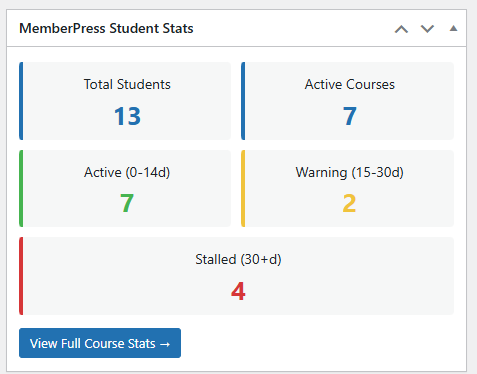
It’s hideable through Screen Options if you don’t want it. But you’ll want it, I’ve found it gives me an instant health check on my students every time I log in.
I think the only reason to hide it would be if you notice any lag in the loading time of the WP dashboard.
Performance Notes
This queries ALL users, you can change this in the code if needed. For most membership sites it’ll work fast, but with 5000+ members you might want to add pagination.
Each time you load the page it calculates progress fresh which means it can take 2-3 seconds to load if you have hundreds of students, that’s normal for this kind of data aggregation.
Calculations happen server-side so there’s no JavaScript lag it’s just PHP working through the MemberPress API.
There is no performance impact on the front-end site because this only runs in wp-admin and only when you actually visit the stats page.
Who This Plugin Is For
If you’re running MemberPress Courses and you have more than 20-30 active students you probably need something like this. Built-in MemberPress tools are fine for tiny courses but they don’t scale well.
It’s particularly useful if you’re actively trying to improve completion rates, which you should be given those industry stats I mentioned earlier. Being able to see at a glance who’s falling behind lets you intervene early instead of watching people silently churn out (and then wondering why your renewal rates suck).
Webmasters who manage sites for clients will find this helpful too it gives you something concrete to show the client during monthly reports. “Here are your active students, here’s who’s stuck, here’s what I’m doing about it.” Clients love data, even if they don’t totally understand it.
What Could Be Added Later
I built this for my own needs but there are obvious extensions that could make it even better:
- Email integration directly in the dashboard, maybe a “Select All Red Students” checkbox and a bulk email form
- Export to CSV so you can analyze data in Excel or Google Sheets
- Historical tracking to see trends over time, right now it’s just current snapshot
- Lesson-level breakdown to identify any lesson that students quit on
- Automated alerts when a student goes yellow or red
For now though this gives you the visibility you need to actually manage your course students instead of just hoping they finish.
You’re most welcome 🙂