Tired of updating your WordPress theme’s functions.php file, only to have your changes lost with the next theme update?
You’re not alone.
This frustrating cycle is common for WordPress developers and site owners who need to add custom functionality.
The solution is the mu-functions.php file, a powerful WordPress feature that lets you add custom code safely and sustainably.
In this article, we’ll show you how to use mu-functions.php to streamline your WordPress development process.
What is a mu-functions.php File?
The mu-functions.php file is a special file in WordPress that allows you to add custom functions and modifications that apply to all sites in a WordPress multisite network and single-site installations, to separate custom code from the theme’s functions.php file.
Unlike the functions.php file, which is part of a theme and can be overwritten during theme updates, the mu-functions.php file is independent of themes and plugins.
This means that your custom code will remain intact even if you update or change your theme.
Creating Your mu-functions.php File
Step 1: Create the mu-plugins Folder
To use mu-functions.php, you first need to create a directory called “mu-plugins” in your WordPress installation’s wp-content directory. This directory does not exist by default, so you’ll need to create it manually.
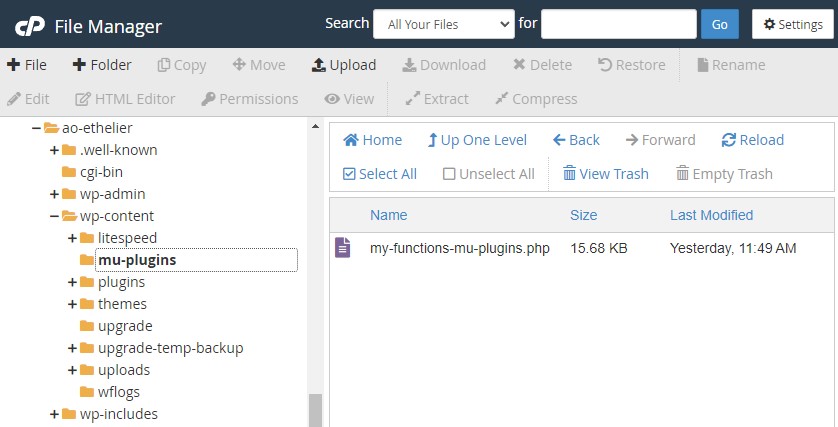
- Using an FTP client or your hosting control panel’s file manager, navigate to your WordPress installation’s wp-content directory.
- Create a new folder and name it “mu-plugins”.
Step 2: Create the File
Inside the mu-plugins directory, create a new file and name it “mu-functions.php”. You can use any text editor to create this file, such as Notepad++, Sublime Text, or the built-in file editor of cPanel.
Open the newly created mu-functions.php file and add the following template at the beginning:
<?php

/**
* Plugin Name: Custom Functions Plugin
* Description: This plugin contains all of my awesome custom functions.
* Author: Me, myself, and I
* Version: 69.0
*/


// TABLE OF CONTENTS ========================================================================================
//1. General things
//2. Rankmath things
//3. Woocommerce things
//4. etc.
This template provides a basic structure for your mu-functions.php file:
- It includes a plugin header comment block that describes the purpose of the file, the author, and the version number.
- Below the header, there’s a table of contents section where you can organize your custom functions into categories for easier navigation. I like adding this as mu-functions plugin file tends to get bloated, and it’s just easier to find things.
Activating Your mu-functions.php File – Already Done
One of the best things about mu-functions.php is that WordPress automatically loads it without any additional configuration.
MU stands for “must use”, which means every plugin in the mu-plugins directory will be activated by default in WP.
Once you’ve created the file in the correct directory and added your custom code, WP automatically finds it and it will be executed on every page load.
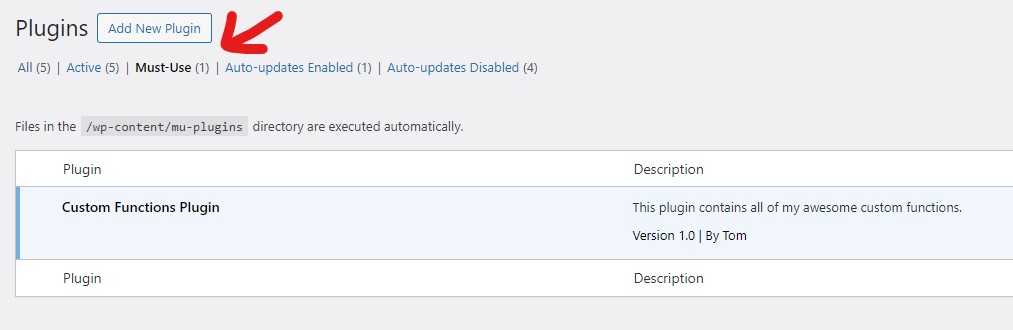
To verify that your mu-functions.php file is working correctly, you can add a simple test function and check if it’s being executed. For example:
function test_mu_functions() {
    echo "I'm alive!";
}
add_action( 'init', 'test_mu_functions' );
This code defines a test_mu_functions() function and echos the text on the front end in the top left corner of the screen when the init hook is fired.
If you see the message, you know that mu-functions.php is working correctly.
Now delete it quickly 🙂
Adding Custom Code to mu-functions.php
To add custom functions to your mu-functions.php file, simply write your PHP code below the table of contents section.
You can define functions, include other files, and use WordPress hooks and filters just like you would in a regular functions.php file.
For example, let’s say you want to add a custom admin footer text. You can add the following code to your mu-functions.php file:
// 1. General things

function custom_admin_footer() {
    echo 'The most awesome custom footer text on the internet';
}
add_filter( 'admin_footer_text', 'custom_admin_footer' );
This code defines a new function called custom_admin_footer() that outputs the custom footer text. It then hooks the function to the admin_footer_text filter to replace the default WordPress admin footer text.
Common Use Cases
The mu-functions.php file is useful for a wide range of customizations.
Here are a few common use cases:
- Adding custom admin functionality: You can use mu-functions.php to add custom admin pages, modify the admin menu, or add custom admin notices.
- Modifying default WordPress behavior: With mu-functions.php, you can change how WordPress behaves by default. For example, you can disable comments on all new posts, change the default post category, or modify the default user roles.
- Implementing custom post types and taxonomies: If you need to create custom post types or taxonomies that are used across multiple themes or plugins, mu-functions.php is an ideal place to define them.
- Adding custom functions for themes and plugins: If you have custom functions that are used by multiple themes or plugins, you can include them in mu-functions.php to make them available throughout your site.
Best Practices
When working with mu-functions.php, there are a few best practices to keep in mind:
- Keep your code organized: Use comments and the table of contents section to keep your code organized and easy to navigate.
- Use descriptive function names: Give your functions descriptive names that clearly indicate their purpose. This will make your code easier to understand and maintain.
- Avoid conflicts with themes and plugins: Be careful not to define functions or use function names that might conflict with those used by your themes or plugins.
Bonus – My mu-functions.php template
You, my faithful reader, are in for a treat.
I’m about to share my standard mu-functions.php file, the one I upload to all new of my sites, and that of client site.
I use Rankmath on all my sites, which is why I have built in functions specific to that plugin as well.
The 11 features this file adds are:
Here’s an analysis of the functions found in your provided mu-functions.php file, along with brief explanations for each:
General Things
- Change Default Gutenberg Image Block Alignment – This function changes the default alignment of the Gutenberg image block to “center” by modifying the block’s attributes during the
inithook. - Add Google Tag Manager Codes – Two functions (
gtm_head_codeandgtm_body_code) are set up to insert Google Tag Manager scripts into the head and body sections of your site. These are currently commented out. - Enable Shortcodes in Titles and Rank Math – Several filters are applied to enable shortcodes within WordPress titles and Rank Math SEO plugin descriptions, allowing dynamic content to be used in these areas.
- Enable Shortcodes on Taxonomy Description Pages – This enables shortcodes to be processed in taxonomy descriptions, enhancing the content flexibility on category and tag pages.
- Shortcodes for Current Year and Month – Two shortcodes,
2026andOctober, are created to display the current year and month, respectively, wherever they are used in WordPress content. - Remove All Feeds Except Main Feed – Actions are removed from
wp_headto disable all RSS feeds except for the main feed, streamlining feed availability. A commented-out function shows how to reinsert the main feed if needed. - Remove WordPress Version – A filter is applied to remove the WordPress version number from being displayed in your site’s HTML source code, enhancing security by obscuring version details.
- Remove jQuery Migrate – This function removes jQuery Migrate from being loaded on the frontend, potentially improving site performance by reducing unnecessary scripts.
- Automatically Set Image Metadata Upon Upload – When an image is uploaded, this function automatically sets its title, alt text, caption, and description based on the file name, improving SEO and accessibility without manual input.
- Add Excerpt Support to Pages – This adds support for excerpts on WordPress pages, allowing you to use this feature beyond just posts.
- Twitter Share Button for Pullquotes – A script is added to create a Twitter share button for pullquotes within posts. This enhances user engagement by allowing readers to easily share highlighted quotes on Twitter.
These functions collectively enhance site functionality, improve SEO capabilities, streamline content management, and offer customization options that can be applied across a WordPress site or network.
<?php

/**
* Plugin Name: Custom Functions Plugin
* Description: This plugin contains all of my awesome custom functions.
* Author: Tom
* Version: 1.0
*/


// TABLE OF CONTENTS ========================================================================================
//1. General things
//2. Rankmath things


//1. GENERAL THINGS ========================================================================================


// changing default gutenberg image block alignment to "center"
function change_default_gutenberg_image_block_options (){
  $block_type = WP_Block_Type_Registry::get_instance()->get_registered( "core/image" );
  $block_type->attributes['align']['default'] = 'center';
}
add_action( 'init', 'change_default_gutenberg_image_block_options');


/*
//Add google tag manager codes in header and body
add_action('wp_head', 'gtm_head_code',20);
Function gtm_head_code(){
?>
<!-- Google Tag Manager -->
<script>(function(w,d,s,l,i){w[l]=w[l]||[];w[l].push({'gtm.start':
new Date().getTime(),event:'gtm.js'});var f=d.getElementsByTagName(s)[0],
j=d.createElement(s),dl=l!='dataLayer'?'&l='+l:'';j.async=true;j.src=
'https://www.googletagmanager.com/gtm.js?id='+i+dl;f.parentNode.insertBefore(j,f);
})(window,document,'script','dataLayer','XXX');</script>
<!-- End Google Tag Manager -->
<?php
}
add_action('wp_body_open', 'gtm_body_code',20);
Function gtm_body_code(){
?>
<!-- Google Tag Manager (noscript) -->
<noscript><iframe src="https://www.googletagmanager.com/ns.html?id=XXX"
height="0" width="0" style="display:none;visibility:hidden"></iframe></noscript>
<!-- End Google Tag Manager (noscript) -->
<?php
}
*/


//Enable shortcode in Title and Rankmath

add_filter( 'the_title', 'do_shortcode' );

add_filter( 'rank_math/paper/auto_generated_description/apply_shortcode', '__return_true' );
add_filter( 'rank_math/product_description/apply_shortcode', '__return_true' );
add_filter( 'rank_math/paper/auto_generated_description/apply_shortcode', '__return_true' );
add_filter( 'rank_math/frontend/title', function( $title ) {
	return do_shortcode( $title );
});
add_filter( 'rank_math/frontend/description', function( $desc) {
	return do_shortcode( $desc );
});


//Enable shortcodes on taxonomy description pages

add_filter( 'term_description', 'shortcode_unautop');
add_filter( 'term_description', 'do_shortcode' );


// Shortcode to display the current year in WordPress
// shortcode: 2026
add_shortcode( 'year' , 'current_year' );
    function current_year() {
    $year = date("Y");
    return "$year";
}

// Shortcode to display the current month in WordPress
// shortcode: October
add_shortcode( 'month' , 'current_month' );
function current_month() {
    $month = date("F");
    return "$month";
}


// Remove all feeds from pages, and reinsert just main feed
remove_action( 'wp_head','feed_links', 2 );
remove_action( 'wp_head','feed_links_extra', 3 );


//add_action( 'wp_head', 'reinsert_rss_feed', 1 );

function reinsert_rss_feed() {
      echo '<link rel="alternate" type="application/rss+xml" title="' . get_bloginfo('sitename') . ' » RSS Feed" href="' . get_bloginfo('rss2_url') . '" />';
}


// Remove WP version
function tgl_remove_version() {
return '';
}
add_filter('the_generator', 'tgl_remove_version');


//Remove JQuery migrate
function remove_jquery_migrate($scripts)
{
    if (!is_admin() && isset($scripts->registered['jquery'])) {
        $script = $scripts->registered['jquery'];

        if ($script->deps) { // Check whether the script has any dependencies
            $script->deps = array_diff($script->deps, array(
                'jquery-migrate'
            ));
        }
    }
}

add_action('wp_default_scripts', 'remove_jquery_migrate');


/* Automatically set the image Title, Alt-Text, Caption & Description upon upload*/

add_action( 'add_attachment', 'my_set_image_meta_upon_image_upload' );
function my_set_image_meta_upon_image_upload( $post_ID ) {

	// Check if uploaded file is an image, else do nothing

	if ( wp_attachment_is_image( $post_ID ) ) {

		$my_image_title = get_post( $post_ID )->post_title;

		// Sanitize the title:  remove hyphens, underscores & extra spaces:
		$my_image_title = preg_replace( '%\s*[-_\s]+\s*%', ' ',  $my_image_title );

		// Sanitize the title:  capitalize first letter of every word (other letters lower case):
		$my_image_title = ucwords( strtolower( $my_image_title ) );

		// Create an array with the image meta (Title, Caption, Description) to be updated
		// Note:  comment out the Excerpt/Caption or Content/Description lines if not needed
		$my_image_meta = array(
			'ID'		=> $post_ID,			// Specify the image (ID) to be updated
			'post_title'	=> $my_image_title,		// Set image Title to sanitized title
			'post_excerpt'	=> "",		// Set image Caption (Excerpt) to sanitized title
			'post_content'	=> "",		// Set image Description (Content) to sanitized title
		);

		// Set the image Alt-Text
		update_post_meta( $post_ID, '_wp_attachment_image_alt', $my_image_title );

		// Set the image meta (e.g. Title, Excerpt, Content)
		wp_update_post( $my_image_meta );

	}
}


/*Add excerpt to Page */

add_post_type_support( 'page', 'excerpt' );


/*Twitter share of pullquote*/

function add_custom_tweet_button_script() {
    global $post;
    if ( has_block( 'core/pullquote', $post ) ) {
        echo '
            <script>
                document.addEventListener("DOMContentLoaded", (event) => {
                    const pullquotes = document.querySelectorAll(".wp-block-pullquote");
                    pullquotes.forEach((pullquote) => {
                        const blockquoteText = pullquote.querySelector("blockquote p").innerText;
                        const blockquoteCite = pullquote.querySelector("blockquote cite") ? pullquote.querySelector("blockquote cite").innerText : "";
                        const tweetText = encodeURIComponent(blockquoteText);
                        const pageUrl = encodeURIComponent(window.location.href);

                        const tweetButtonWrapper = document.createElement("div");
                        tweetButtonWrapper.setAttribute("class", "pullquote-auto-tweet");
                        tweetButtonWrapper.style.position = "absolute";
                        tweetButtonWrapper.style.top = "50px";
                        tweetButtonWrapper.style.right = "10px";

                        const tweetButton = document.createElement("a");
                        tweetButton.setAttribute("class", "twitter-share-button");
                        tweetButton.setAttribute("href", `https://twitter.com/intent/tweet?text=${tweetText}&url=${pageUrl}&via=CupofBig&hashtags=coffee`);
                        tweetButton.setAttribute("data-size", "large");
                        tweetButton.setAttribute("target", "_blank");
                        tweetButton.innerText = "Tweet";

                        const twitterScript = document.createElement("script");
                        twitterScript.setAttribute("async", "");
                        twitterScript.setAttribute("src", "https://platform.twitter.com/widgets.js");
                        twitterScript.setAttribute("charset", "utf-8");

                        tweetButtonWrapper.appendChild(tweetButton);
                        tweetButtonWrapper.appendChild(twitterScript);
                        pullquote.style.position = "relative";
                        pullquote.appendChild(tweetButtonWrapper);
                    });
                });
            </script>
        ';
    }
}
add_action('wp_footer', 'add_custom_tweet_button_script');
By using mu-functions.php, you can add custom code that’s independent of your theme and plugins, making it easier to manage and maintain over time.
Say thanks in a comment if you use it 🙂