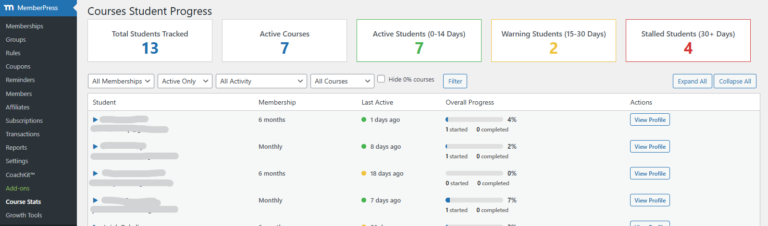
MemberPress Courses is a powerful LMS plugin, but it falls short when it comes to displaying user progress and course navigation in a flexible manner. It’s library of action hooks doesn’t help with this task.
One significant limitation is the lack of customizable shortcodes for showing course progress bars and next lesson links outside of the default ReadyGo course and account pages.
Displaying this information on user dashboards or custom pages is a totally valid idea, since it gives the students a quick way to jump back into their course.
To address this issue, we’ve developed two versatile shortcodes that allow you to:
- Display course progress bars and
- Display next lesson link in a variety of ways anywhere on your WordPress site.
These shortcodes offer various display options and can be easily customized to fit your specific needs.
How It Works
Our custom shortcodes leverage the functionality provided by MemberPress’s built-in UserProgress class, located in the models/user-progress.php file. This class is a cornerstone of the MemberPress Courses system, offering a range of methods to track and display user progress across courses.
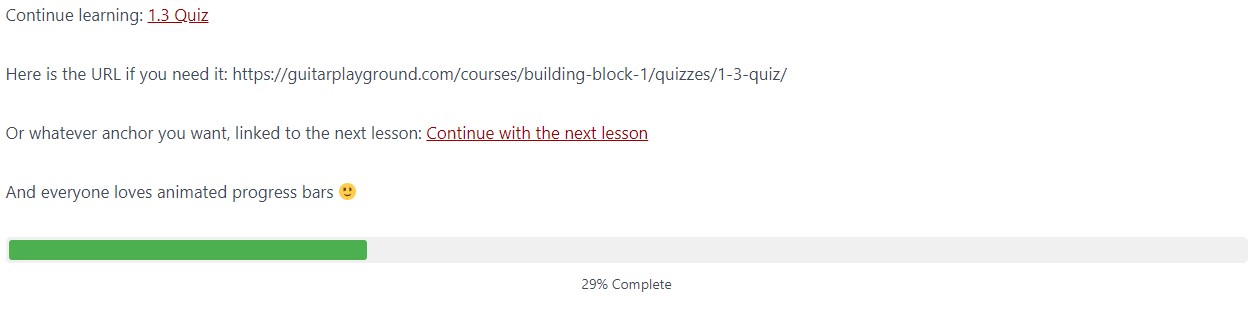
This will be the result:
Key Classes Utilized
find_all_by_user(): This method retrieves all progress records for a specific user across all courses.next_lesson(): This crucial method finds the next uncompleted lesson for a user in a specific course.user_progress(): This method calculates the overall progress percentage for a user in a specific course.
Other Useful Classes in UserProgress.php
The UserProgress class contains several other methods that developers might find useful for extending MemberPress functionality:
find_all_by_user_and_course(): Retrieves all progress records for a specific user and course.has_completed_lesson(): Checks if a user has completed a specific lesson.has_completed_course(): Determines if a user has finished an entire course.get_course_completion_date(): Retrieves the date when a user completed a course.get_course_start_date(): Fetches the date when a user started a course.
These methods provide a robust foundation for creating custom progress tracking and reporting features within MemberPress Courses.
It would be better if their hooks would utilize these to return the vast array of things they store, but for now, our shortcode will do.
Progress Bar Shortcode
The progress bar shortcode provides a visual representation of a user’s course progress directly on any page of your WordPress site.
Here’s a breakdown of its functionality and customization options:
What it does
This shortcode automatically detects the user’s most recent course and displays their progress as a percentage. It creates a sleek, animated progress bar that fills from 0% to the actual completion percentage over a 1-second period when the page loads.
Why inline CSS?
We’ve used inline CSS for a few reasons:
- Immediate visual feedback without requiring additional stylesheet loading
- Ensures the progress bar looks good out-of-the-box
- Allows for easy customization directly in the shortcode
Customizing the progress bar
You have two main options for customizing the appearance of the progress bar:
- Via WordPress Customizer:
Add custom CSS to your theme using the WordPress Customizer. Target the following classes:.mpcs-progress-container: Styles the outer container.mpcs-progress-bar: Styles the progress bar itself.mpcs-progress-text: Styles the percentage text
.mpcs-progress-container { background-color: #f0f0f0; border-radius: 10px; } .mpcs-progress-bar { background-color: #4CAF50; height: 25px; } - Directly in the shortcode:
You can pass custom styles as attributes to the shortcode.
function mpcs_auto_course_progress_bar_shortcode($atts) {

  	/*You can use the shortcode with these new options like this, using the style argument:

      [mpcs_auto_course_progress] (default, shows progress bar)
      [mpcs_auto_course_progress style="name"]
      [mpcs_auto_course_progress style="namelink"]
      [mpcs_auto_course_progress style="progress"]
    */


    if (!is_user_logged_in()) {
        return 'Please log in to view course progress.';
    }

    $atts = shortcode_atts(array(
        'style' => 'progressbar',
    ), $atts, 'mpcs_auto_course_progress');

    $user_id = get_current_user_id();
    $user_progress_objects = memberpress\courses\models\UserProgress::find_all_by_user($user_id);

    if (empty($user_progress_objects)) {
        return 'No course progress found.';
    }

    $latest_progress = reset($user_progress_objects);
    $course_id = $latest_progress->course_id;

    $course = new memberpress\courses\models\Course($course_id);
    $progress = $course->user_progress($user_id);

    switch ($atts['style']) {
        case 'name':
            return esc_html($course->post_title);
        case 'namelink':
            return '<a href="' . esc_url(get_permalink($course->ID)) . '">' . esc_html($course->post_title) . '</a>';
        case 'progressbar':
        default:
            $output = '<div class="mpcs-progress-container" style="width: 100%; background-color: #f0f0f0; border-radius: 5px; padding: 3px; margin-bottom: 10px;">';
            $output .= '<div class="mpcs-progress-bar" style="width: 0%; height: 20px; background-color: #4CAF50; border-radius: 3px; transition: width 1s ease-in-out;"></div>';
            $output .= '</div>';
            $output .= '<div class="mpcs-progress-text" style="text-align: center; font-size: 14px;">0% Complete</div>';

            $output .= '<script>
                document.addEventListener("DOMContentLoaded", function() {
                    setTimeout(function() {
                        var progressBar = document.querySelector(".mpcs-progress-bar");
                        var progressText = document.querySelector(".mpcs-progress-text");
                        progressBar.style.width = "' . $progress . '%";
                        progressText.textContent = "' . $progress . '% Complete";
                    }, 100);
                });
            </script>';

            return $output;
    }
}


add_shortcode('mpcs_course_progress', 'mpcs_auto_course_progress_bar_shortcode');
Add this code to your functions.php or custom plugin file and use the shortcode anywhere on your site to view the progress bar.
[mpcs_course_progress]We added a few arguments in case you want to show the name or link to the course as well. Here are the possible arguments:
      [mpcs_course_progress] (default, shows progress bar)
      [mpcs_course_progress style="name"]
      [mpcs_course_progress style="namelink"]
      [mpcs_course_progress style="progress"]
Next Lesson Shortcode
The next lesson shortcode provides a flexible way to display a link to the user’s next lesson in their course progression. This shortcode can be customized to fit various design needs and content requirements.
First, here is the code for the shortcode. There is a short explainer of the args so you don’t forget, but I’ll explain the options below.
// Creates next lesson link
function mpcs_next_lesson_link_shortcode($atts) {

  /*Usage:
  Default (no args): [mpcs_next_lesson_link]
  Outputs the lesson name as a hyperlink to its URL.

  URL only: [mpcs_next_lesson_link style="url"]
  Outputs just the lesson URL, without any HTML.

  Text only: [mpcs_next_lesson_link style="text"]
  Outputs just the name of the lesson without a hyperlink.

  Custom anchor: [mpcs_next_lesson_link style="anchor" anchor="Continue Learning"]
  Outputs a hyperlink to the lesson with the specified anchor text.
  */

    if (!is_user_logged_in()) {
        return 'Please log in to view your next lesson.';
    }

    $atts = shortcode_atts(array(
        'style' => 'default',
        'anchor' => '',
    ), $atts, 'mpcs_next_lesson_link');

    $user_id = get_current_user_id();
    $user_progress_objects = memberpress\courses\models\UserProgress::find_all_by_user($user_id);
    $next_lesson = null;

    foreach ($user_progress_objects as $progress) {
        $course_id = $progress->course_id;
        $next_course_lesson = memberpress\courses\models\UserProgress::next_lesson($user_id, $course_id);

        if ($next_course_lesson !== false && is_object($next_course_lesson)) {
            $next_lesson = $next_course_lesson;
            break;
        }
    }

    if ($next_lesson) {
        $next_lesson_url = get_permalink($next_lesson->ID);
        $next_lesson_title = $next_lesson->post_title;

        switch ($atts['style']) {
            case 'url':
                return esc_url($next_lesson_url);
            case 'text':
                return esc_html($next_lesson_title);
            case 'anchor':
                $anchor_text = !empty($atts['anchor']) ? esc_html($atts['anchor']) : 'Continue to Next Lesson';
                return '<a href="' . esc_url($next_lesson_url) . '">' . $anchor_text . '</a>';
            default:
                return '<a href="' . esc_url($next_lesson_url) . '">' . esc_html($next_lesson_title) . '</a>';
        }
    } else {
        return 'No lesson progress found. Why not start a new course?';
    }
}
add_shortcode('mpcs_next_lesson_link', 'mpcs_next_lesson_link_shortcode');
Usage
The basic usage of the Memberpress next lesson shortcode is:
[mpcs_next_lesson_link]This default version outputs the lesson name as a hyperlink to its URL.
Available Arguments
The shortcode accepts a ‘style’ argument with the following options:
- Default (no args):
[mpcs_next_lesson_link]Outputs the lesson name as a hyperlink to its URL. - URL only:
[mpcs_next_lesson_link style="url"]Outputs just the lesson URL, without any HTML. - Text only:
[mpcs_next_lesson_link style="text"]Outputs just the name of the lesson without a hyperlink. - Custom anchor:
[mpcs_next_lesson_link style="anchor" anchor="Continue Learning"]Outputs a hyperlink to the lesson with the specified anchor text.
By offering these different output styles, you can easily integrate the next lesson link into various parts of your site, such as sidebars, footers, or custom dashboard pages.
This flexibility allows you to create a more intuitive and personalized learning experience for your students, guiding them seamlessly through your course content.
You’re welcome 😉