In this article, we’ll explore how to migrate existing WordPress posts to a new custom post type, along with their categories, subcategories, and tags.
The Problem
I created a site for my agency and initially used standard WordPress posts for our internal knowledge base articles.
However, as the need for a separate agency blog arose, I realized that these internal documents needed to be managed independently from regular blog posts.
The solution was to create a new custom post type for the knowledge base and migrate the existing posts to this new type.
Now creating a custom post type in WP is easy enough. You can use a plugin, or better yet, write or generate the code and insert it into your WP installation’s custom functions file.
But migrating wasn’t.
The Challenge
Migrating or copying posts isn’t as straightforward as it sounds.
It involves not only moving the posts themselves but also their associated categories, subcategories, and tags. This process requires careful handling to ensure data integrity and to avoid potential database inconsistencies.
The Solution and Code
To tackle this challenge, I wrote a custom PHP script that creates a new admin menu item under the “Tools” section, titled “Post Type Migrator.”
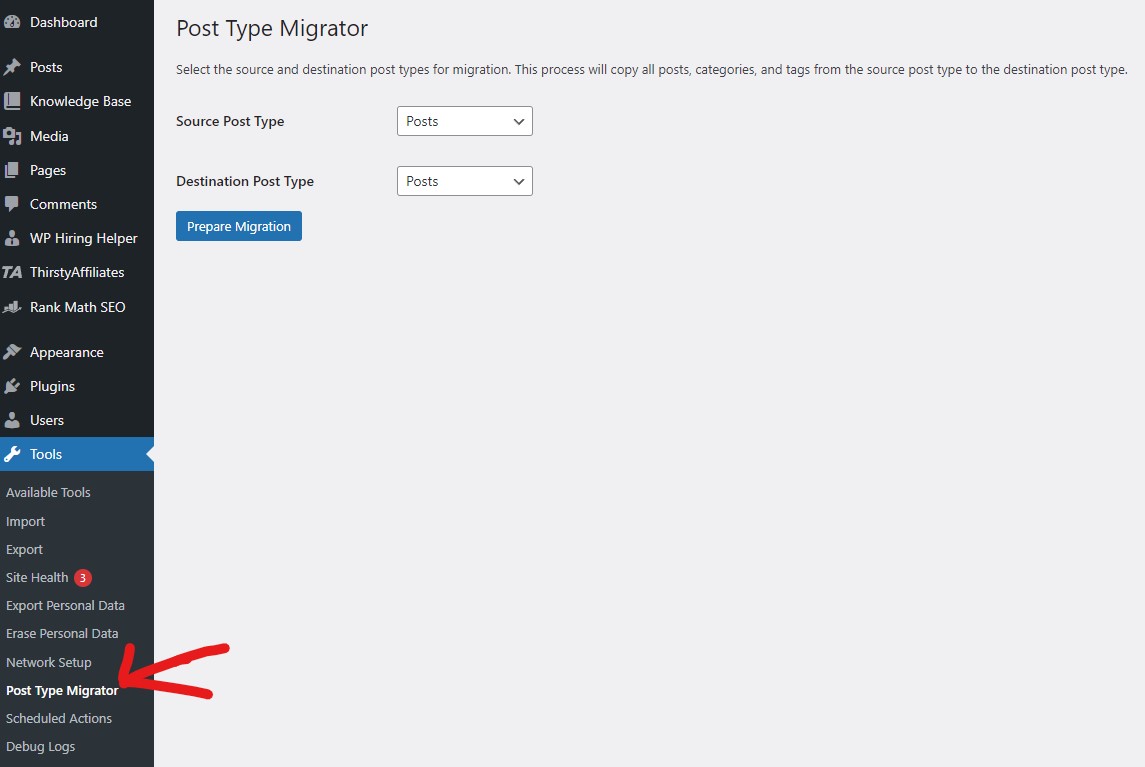
This tool allows you to select the source and destination post types and then migrates all posts, categories, and tags accordingly.
Before we dive into the code, it’s essential to understand the importance of backing up your database. This process makes irreversible changes, so having a complete backup is crucial.
Warning: Always back up your database before proceeding with any migration process.
Front end part of the migration tool
Now let’s take a look at how the admin menu item is created and how the migration process is initiated. Here is the entire code base, I’ll explain what it does underneath.
// Add admin menu item under tools - Post type migrator
function kb_migration_admin_menu() {
    add_management_page('Post Type Migrator', 'Post Type Migrator', 'manage_options', 'post-type-migrator', 'kb_migration_page');
}
add_action('admin_menu', 'kb_migration_admin_menu');

function kb_migration_page() {
    // Get all post types
    $post_types = get_post_types(array('public' => true), 'objects');

    ?>
    <div class="wrap">
        <h1>Post Type Migrator</h1>

        <?php
        // Check if the confirmation has been given
        if (isset($_POST['confirm_migration']) && check_admin_referer('kb_migration_nonce', 'kb_migration_nonce_field')) {
            $source_post_type = sanitize_text_field($_POST['source_post_type']);
            $destination_post_type = sanitize_text_field($_POST['destination_post_type']);

            if ($source_post_type === $destination_post_type) {
                echo '<div class="notice notice-error"><p>Source and destination post types cannot be the same.</p></div>';
            } else {
                $result = migrate_content($source_post_type, $destination_post_type);
                echo '<div class="notice notice-info"><p>' . esc_html($result) . '</p></div>';
            }
        } elseif (isset($_POST['run_kb_migration']) && check_admin_referer('kb_migration_nonce', 'kb_migration_nonce_field')) {
            // Show confirmation screen
            ?>
            <div class="notice notice-warning">
                <p><strong>Warning:</strong> This process will make irreversible changes to your database. Please make sure you have a complete backup of your database before proceeding.</p>
                <p>Are you sure you want to continue?</p>
            </div>
            <form method="post">
                <?php wp_nonce_field('kb_migration_nonce', 'kb_migration_nonce_field'); ?>
                <input type="hidden" name="source_post_type" value="<?php echo esc_attr($_POST['source_post_type']); ?>">
                <input type="hidden" name="destination_post_type" value="<?php echo esc_attr($_POST['destination_post_type']); ?>">
                <input type="submit" name="confirm_migration" class="button button-primary" value="Yes, I have a backup. Proceed with migration">
                <a href="<?php echo esc_url(remove_query_arg('run_kb_migration')); ?>" class="button">Cancel</a>
            </form>
            <?php
            return;
        }
        ?>

        <p>Select the source and destination post types for migration. This process will copy all posts, categories, and tags from the source post type to the destination post type.</p>
        <form method="post">
            <?php wp_nonce_field('kb_migration_nonce', 'kb_migration_nonce_field'); ?>

            <table class="form-table">
                <tr valign="top">
                    <th scope="row"><label for="source_post_type">Source Post Type</label></th>
                    <td>
                        <select name="source_post_type" id="source_post_type" required>
                            <?php foreach ($post_types as $post_type) : ?>
                                <option value="<?php echo esc_attr($post_type->name); ?>"><?php echo esc_html($post_type->label); ?></option>
                            <?php endforeach; ?>
                        </select>
                    </td>
                </tr>

                <tr valign="top">
                    <th scope="row"><label for="destination_post_type">Destination Post Type</label></th>
                    <td>
                        <select name="destination_post_type" id="destination_post_type" required>
                            <?php foreach ($post_types as $post_type) : ?>
                                <option value="<?php echo esc_attr($post_type->name); ?>"><?php echo esc_html($post_type->label); ?></option>
                            <?php endforeach; ?>
                        </select>
                    </td>
                </tr>
            </table>

            <input type="submit" name="run_kb_migration" class="button button-primary" value="Prepare Migration">
        </form>
    </div>
    <?php
}
Let’s break down the code that handles the migration process step by step:
- Adding Admin Menu Item
- The
kb_migration_admin_menufunction adds a new admin menu item under “Tools” named “Post Type Migrator.” - This menu item is linked to the
kb_migration_pagefunction, which handles the migration process.
   function kb_migration_admin_menu() {
       add_management_page('Post Type Migrator', 'Post Type Migrator', 'manage_options', 'post-type-migrator', 'kb_migration_page');
   }
add_action('admin_menu', 'kb_migration_admin_menu');- Migration Page Functionality
- The
kb_migration_pagefunction retrieves all public post types and displays a form to select the source and destination post types for migration. - It checks if the user has submitted the form and confirmed the migration. If so, it calls the
migrate_contentfunction to perform the migration.
   function kb_migration_page() {
       $post_types = get_post_types(array('public' => true), 'objects');
       ?>
       <div class="wrap">
           <h1>Post Type Migrator</h1>
           <?php
// ... (rest of the code)- Form Submission and Confirmation
- Upon form submission, the function checks if the source and destination post types are the same. If they are, it displays an error message.
- If they are different, it calls the
migrate_contentfunction to perform the migration.
   if (isset($_POST['confirm_migration']) && check_admin_referer('kb_migration_nonce', 'kb_migration_nonce_field')) {
       $source_post_type = sanitize_text_field($_POST['source_post_type']);
       $destination_post_type = sanitize_text_field($_POST['destination_post_type']);

       if ($source_post_type === $destination_post_type) {
           echo '<div class="notice notice-error"><p>Source and destination post types cannot be the same.</p></div>';
       } else {
           $result = migrate_content($source_post_type, $destination_post_type);
           echo '<div class="notice notice-info"><p>' . esc_html($result) . '</p></div>';
       }
}- Migration Confirmation Screen
- Before proceeding with the migration, the function displays a confirmation screen to ensure the user has a complete backup of their database.
   elseif (isset($_POST['run_kb_migration']) && check_admin_referer('kb_migration_nonce', 'kb_migration_nonce_field')) {
       ?>
       <div class="notice notice-warning">
           <p><strong>Warning:</strong> This process will make irreversible changes to your database. Please make sure you have a complete backup of your database before proceeding.</p>
           <p>Are you sure you want to continue?</p>
       </div>
       <form method="post">
           <?php wp_nonce_field('kb_migration_nonce', 'kb_migration_nonce_field'); ?>
           <input type="hidden" name="source_post_type" value="<?php echo esc_attr($_POST['source_post_type']); ?>">
           <input type="hidden" name="destination_post_type" value="<?php echo esc_attr($_POST['destination_post_type']); ?>">
           <input type="submit" name="confirm_migration" class="button button-primary" value="Yes, I have a backup. Proceed with migration">
           <a href="<?php echo esc_url(remove_query_arg('run_kb_migration')); ?>" class="button">Cancel</a>
       </form>
       <?php
       return;
   }
In the next part of this article, we’ll delve into the migrate_content function, which performs the actual migration of posts, categories, and tags from the source post type to the destination post type. This includes handling database transactions to ensure data integrity and rolling back changes in case of errors.
The Migration Code
Now for the actual migration code. Here it is in a single block, I’ll explain everything after.
//Migrate posts function

function migrate_content($source_post_type, $destination_post_type) {
    global $wpdb;

    // Start transaction
    $wpdb->query('START TRANSACTION');

    try {
        $migrated_count = 0;
        $category_map = array();
        $tag_map = array();

        // Determine source and destination taxonomies
        $source_taxonomies = get_object_taxonomies($source_post_type, 'names');
        $dest_taxonomies = get_object_taxonomies($destination_post_type, 'names');

        $source_cat_taxonomy = in_array('category', $source_taxonomies) ? 'category' : (isset($source_taxonomies[0]) ? $source_taxonomies[0] : '');
        $dest_cat_taxonomy = in_array('category', $dest_taxonomies) ? 'category' : (isset($dest_taxonomies[0]) ? $dest_taxonomies[0] : '');

        $source_tag_taxonomy = in_array('post_tag', $source_taxonomies) ? 'post_tag' : (isset($source_taxonomies[1]) ? $source_taxonomies[1] : '');
        $dest_tag_taxonomy = in_array('post_tag', $dest_taxonomies) ? 'post_tag' : (isset($dest_taxonomies[1]) ? $dest_taxonomies[1] : '');

        // Migrate categories
        $categories = get_terms(array('taxonomy' => $source_cat_taxonomy, 'hide_empty' => false, 'orderby' => 'parent', 'order' => 'ASC'));

        foreach ($categories as $category) {
            $parent_id = 0;
            if ($category->parent != 0 && isset($category_map[$category->parent])) {
                $parent_id = $category_map[$category->parent];
            }

            $new_term = term_exists($category->name, $dest_cat_taxonomy);
            if (!$new_term) {
                $new_term = wp_insert_term($category->name, $dest_cat_taxonomy, array(
                    'slug' => $category->slug,
                    'parent' => $parent_id,
                    'description' => $category->description
                ));
            } else {
                wp_update_term($new_term['term_id'], $dest_cat_taxonomy, array(
                    'parent' => $parent_id,
                    'description' => $category->description
                ));
            }

            if (!is_wp_error($new_term)) {
                $category_map[$category->term_id] = $new_term['term_id'];
            } else {
                throw new Exception("Failed to create or update category: " . $new_term->get_error_message());
            }
        }

        // Migrate tags
        $tags = get_terms(array('taxonomy' => $source_tag_taxonomy, 'hide_empty' => false));

        foreach ($tags as $tag) {
            $new_term = term_exists($tag->name, $dest_tag_taxonomy);
            if (!$new_term) {
                $new_term = wp_insert_term($tag->name, $dest_tag_taxonomy, array(
                    'slug' => $tag->slug,
                    'description' => $tag->description
                ));
            }

            if (!is_wp_error($new_term)) {
                $tag_map[$tag->term_id] = $new_term['term_id'];
            } else {
                throw new Exception("Failed to create or update tag: " . $new_term->get_error_message());
            }
        }

        // Migrate posts
        $posts = get_posts(array(
            'post_type' => $source_post_type,
            'numberposts' => -1,
            'post_status' => 'any'
        ));

        foreach ($posts as $post) {
            $post_data = array(
                'post_title'    => $post->post_title,
                'post_content'  => $post->post_content,
                'post_status'   => $post->post_status,
                'post_author'   => $post->post_author,
                'post_excerpt'  => $post->post_excerpt,
                'post_date'     => $post->post_date,
                'post_type'     => $destination_post_type,
            );

            $new_post_id = wp_insert_post($post_data);

            if (is_wp_error($new_post_id)) {
                throw new Exception("Failed to create new post: " . $new_post_id->get_error_message());
            }

            // Copy categories
            $post_categories = wp_get_post_terms($post->ID, $source_cat_taxonomy, array('fields' => 'ids'));
            $new_categories = array();
            foreach ($post_categories as $cat_id) {
                if (isset($category_map[$cat_id])) {
                    $new_categories[] = $category_map[$cat_id];
                }
            }
            wp_set_post_terms($new_post_id, $new_categories, $dest_cat_taxonomy);

            // Copy tags
            $post_tags = wp_get_post_terms($post->ID, $source_tag_taxonomy, array('fields' => 'ids'));
            $new_tags = array();
            foreach ($post_tags as $tag_id) {
                if (isset($tag_map[$tag_id])) {
                    $new_tags[] = $tag_map[$tag_id];
                }
            }
            wp_set_post_terms($new_post_id, $new_tags, $dest_tag_taxonomy);

            $migrated_count++;
        }

        // If we've made it this far without exceptions, commit the transaction
        $wpdb->query('COMMIT');
        return "Migration completed successfully. {$migrated_count} posts migrated to {$destination_post_type}.";
    } catch (Exception $e) {
        // If an error occurred, rollback the transaction
        $wpdb->query('ROLLBACK');
        return "Error occurred during migration: " . $e->getMessage();
    }
}
Now, let’s dive into the actual migration code and explore its key strategies.
The migrate_content Function
The migrate_content function is responsible for migrating posts, categories, and tags from the source post type to the destination post type. Here’s a detailed breakdown of the code:
function migrate_content($source_post_type, $destination_post_type) {
    global $wpdb;

    // Start transaction
    $wpdb->query('START TRANSACTION');

    try {
        // ... (migration code)

        // If we've made it this far without exceptions, commit the transaction
        $wpdb->query('COMMIT');
        return "Migration completed successfully. {$migrated_count} posts migrated to {$destination_post_type}.";
    } catch (Exception $e) {
        // If an error occurred, rollback the transaction
        $wpdb->query('ROLLBACK');
        return "Error occurred during migration: " . $e->getMessage();
    }
}
The function starts by initiating a database transaction using $wpdb->query('START TRANSACTION'). This ensures that all database operations are treated as a single unit of work[1]. If any error occurs during the migration process, the transaction will be rolled back, maintaining data integrity.
Determining Source and Destination Taxonomies
The function determines the source and destination taxonomies for categories and tags using the get_object_taxonomies function. It checks if the default ‘category’ and ‘post_tag’ taxonomies are available for the source and destination post types. If not, it uses the first and second available taxonomies, respectively.
$source_taxonomies = get_object_taxonomies($source_post_type, 'names');
$dest_taxonomies = get_object_taxonomies($destination_post_type, 'names');

$source_cat_taxonomy = in_array('category', $source_taxonomies) ? 'category' : (isset($source_taxonomies[0]) ? $source_taxonomies[0] : '');
$dest_cat_taxonomy = in_array('category', $dest_taxonomies) ? 'category' : (isset($dest_taxonomies[0]) ? $dest_taxonomies[0] : '');

$source_tag_taxonomy = in_array('post_tag', $source_taxonomies) ? 'post_tag' : (isset($source_taxonomies[1]) ? $source_taxonomies[1] : '');
$dest_tag_taxonomy = in_array('post_tag', $dest_taxonomies) ? 'post_tag' : (isset($dest_taxonomies[1]) ? $dest_taxonomies[1] : '');
Migrating Categories and Tags
The function retrieves all categories and tags from the source taxonomies using get_terms. It then iterates over each category and tag, creating or updating them in the destination taxonomies using wp_insert_term and wp_update_term.
$categories = get_terms(array('taxonomy' => $source_cat_taxonomy, 'hide_empty' => false, 'orderby' => 'parent', 'order' => 'ASC'));

foreach ($categories as $category) {
    // ... (category migration code)
}

$tags = get_terms(array('taxonomy' => $source_tag_taxonomy, 'hide_empty' => false));

foreach ($tags as $tag) {
    // ... (tag migration code)
}
The function maintains a mapping of source category and tag IDs to their corresponding destination IDs using the $category_map and $tag_map arrays. This mapping is used later when assigning categories and tags to the migrated posts.
Migrating Posts
The function retrieves all posts from the source post type using get_posts. It then iterates over each post, creating a new post in the destination post type using wp_insert_post.
$posts = get_posts(array(
    'post_type' => $source_post_type,
    'numberposts' => -1,
    'post_status' => 'any'
));

foreach ($posts as $post) {
    // ... (post migration code)
}
For each migrated post, the function copies the associated categories and tags using the previously created mappings and assigns them to the new post using wp_set_post_terms.
Committing or Rolling Back the Transaction
If the migration process completes without any exceptions, the function commits the transaction using $wpdb->query('COMMIT'), making all the changes permanent[1].
However, if an exception occurs during the migration process, the function catches it and rolls back the transaction using $wpdb->query('ROLLBACK'), undoing all the changes made within the transaction[1]. This ensures that the database remains in a consistent state even if an error occurs.
Why I Think This Code Is Nice
The migrate_content function provides a robust solution for migrating posts, categories, and tags from one post type to another. By utilizing database transactions, it ensures data integrity and allows for a safe rollback in case of errors.
This script leaves the original posts and taxonomy in their original place. I was thinking whether they should be deleted automatically, but realized it might be better to leave them there as a quick reference, just to make sure everything is in the new location as well. You can remove the old posts and taxonomy after checking.
I hope this detailed explanation of the migration code helps you understand the intricacies of the process. Feel free to adapt and use this code in your own projects when you need to migrate content between post types.
References:
: WordPress Database Transactions
: get_object_taxonomies
: get_terms
: wp_insert_term, wp_update_term
: get_posts
: wp_insert_post
: wp_set_post_terms